
To facilitate users, the Dubai government launches several initiatives and the DubaiNow app is one of them. With this app, payments for various government services can be made conveniently. We have compiled a list of all the fines and bills that you can pay using the DubaiNow App.
How to Pay Using the DubaiNow App in Dubai

DubaiNow is a comprehensive mobile app launched by the Dubai government to streamline and simplify various city services, including bill payments and Dubai traffic fines, among others. It aims to provide a convenient, one-stop solution for residents and visitors. Simply put, using the DubaiNow App for payments helps streamline your financial transactions and manage various services efficiently from your mobile device.
To pay using the DubaiNow App, follow these steps:

- Download the App: Get the DubaiNow App from the Apple App Store or Google Play Store if you haven’t already.
- Register: Open the app, sign up with your Emirates ID or mobile number and verify your number with the code you receive.
- Log In: Access the app using your credentials.
- Navigate to Payments: On the home screen, go to the ‘Payments’ section to view payment options.
- Select Payment Type: Choose what you want to pay for, such as utility bills, traffic fines, or Dubai Metro fares.
- Enter Details: Provide the necessary details, like your account number for utility bills.
- Payment Methods: Pay using a credit/debit card or other methods available in the app.
- Review and Confirm: Check your payment details for accuracy before submitting.
- Receive Confirmation: Once processed, you’ll get a notification confirming your payment.
- Track Payments: View your payment history and receipts in the app.
- Get Notifications: The app will alert you to successful payments and updates.
- Set Reminders: Schedule reminders for upcoming bills to avoid missing payments.
- Customer Support: Contact support directly through the app for any issues.
- Security: The app uses advanced security to protect your financial information.
Bill Payments Using DubaiNow App in Dubai
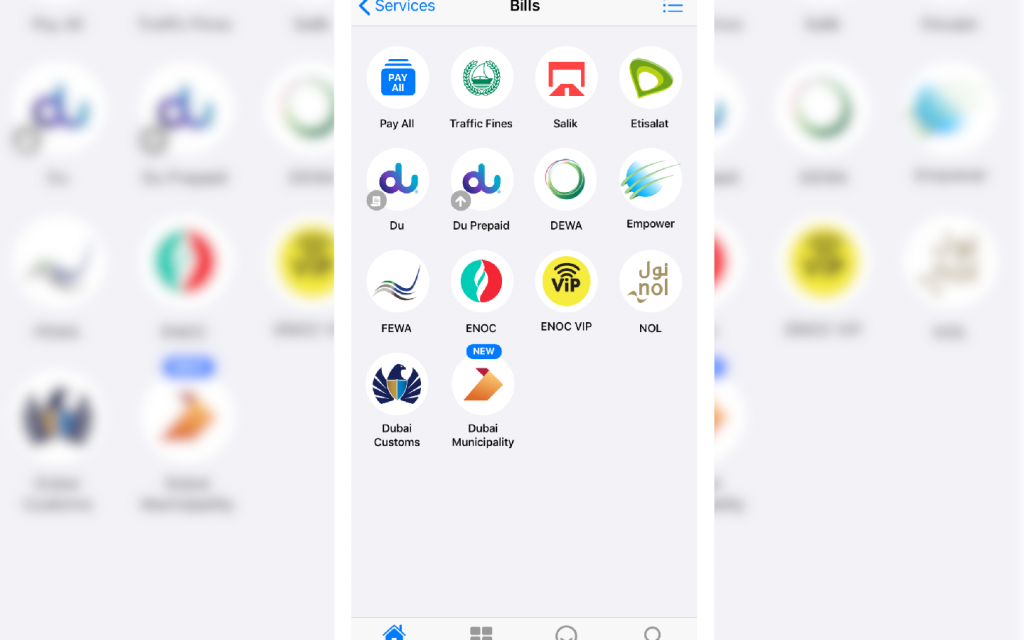
Save yourself from the consequences of non-payment of utility bills in Dubai. Just pay different types of bills using the DubaiNow App. Here are some of the bills you can settle through the app:
- Etisalat
- Salik
- du (including du Prepaid)
- Dubai Customs
- DEWA. (Here’s everything you need to know to get a complete understanding of your DEWA bill)
- Empower
- ENOC VIP
- NOL
- Dubai Municipality
- FEWA
Services Available Through the App include:

- DEWA: Manage your account, download bills and receipts.
- du: Activate and manage your phone, TV and internet services.
- Salik: Check and manage your Salik account balance.
- ENOC VIP: Refuel your account and pay for fuel at ENOC stations.
- FEWA: Stay updated on your Federal Electricity & Water Authority bills.
- Education: Pay for school or online tuition fees if your child is enrolled in an educational institute.
The DubaiNow App also makes it easy to pay for:
- Parking: Pay for car parking in Dubai and keep track of your expenses.
- Ramadan Contributions: During Ramadan, you can pay Zakat, Zakat-al-Fitr, or donate iftar meals. Just log in with your UAE Pass, link your debit or credit card and make your payment under the ‘Islam’ and ‘Donation’ tabs.
Key Features of the DubaiNow App
The DubaiNow App offers several key features to enhance convenience and streamline access to various services. Here are some of its main features:
- Comprehensive Service Access: Provides access to a wide range of city services, including utility bill payments, traffic fines and Dubai Metro fares.
- Payment Integration: Allows users to pay for utilities, fines and other services using various payment methods, including credit/debit cards.
- Transaction History: Users can view their past transactions and receipts within the app for easy tracking.
- Bill Reminders: Set reminders for upcoming bills to ensure timely payments.
- Real-Time Notifications: Receive updates and notifications for successful payments and any relevant changes to your transactions.
- Secure Transactions: Utilises advanced security measures to protect users’ financial information and ensure secure transactions.
- Customer Support: Provides direct access to customer support for assistance with issues or questions.
- User-Friendly Interface: Features an intuitive design that makes navigating and accessing services simple and efficient.
- Multilingual Support: Offers multiple language options to accommodate the diverse population of Dubai.
- Service Updates: Provides information and updates on new services or changes to existing ones.
FAQS
What types of bills can be paid using the DubaiNow App?
With the DubaiNow App, you can pay for utility bills (DEWA, FEWA), telecommunications services (Etisalat, du), parking (Salik), fuel (ENOC VIP) and various other services like traffic fines and educational fees.
How can payments be made with the DubaNow App?
To pay using the DubaiNow App, open the app, go to the ‘Payments’ section, select the type of payment, enter the required details, choose your payment method, review the information and confirm the payment.
What kind of payment methods are accepted?
The app accepts payments via credit/debit cards and other integrated payment methods.
Can users review their payment history?
Yes, users can view past transactions and receipts in the ‘Transaction History’ section of the app.
That is all you need to know about the DubaiNow app payment method. You can also make various payments through the Al Ansari Exchange in Dubai.
Stay tuned to dubizzle’s property blog for more on various payment services offered across the UAE.